Child Workflows Pattern 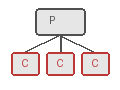
Overview
Child Workflows enable decomposition of complex business logic into smaller, reusable Workflow units. Each child executes as an independent Workflow with its own Workflow ID, event history (50K event limit), and lifecycle. Unlike Activities which execute code, Child Workflows orchestrate processes and provide Workflow-level semantics: independent tracking, querying, timeouts, and the ability to outlive the parent.
Key capabilities:
- Independent identity: Each child has a unique Workflow ID visible in the UI for tracking and querying.
- Separate history: Each child maintains its own event history, preventing parent history bloat.
- Flexible invocation: Synchronous (blocking) or asynchronous (non-blocking) execution.
- Lifecycle control: Parent close policies (TERMINATE, ABANDON, REQUEST_CANCEL) determine child behavior when the parent completes.
- Task Queue routing: Children can execute on different Task Queues with specialized Workers.
- Reusability: The same Child Workflow logic can be invoked by multiple different parent Workflows.
Problem
In distributed systems, you often need Workflows that break down complex processes into modular, reusable components, execute sub-processes that may outlive the parent Workflow, coordinate multiple independent Workflows with different lifecycles, isolate failure domains while maintaining orchestration control, and reuse Workflow logic across different parent Workflows.
Without Child Workflows, you must implement all logic in a single monolithic Workflow, manually coordinate separate Workflows via Signals and Queries, duplicate Workflow logic across multiple implementations, and manage complex state machines for sub-process coordination.
Solution
You invoke Child Workflows from within parent Workflows using the SDK's Child Workflow API. You can call them synchronously (blocking until completion) or asynchronously (fire-and-forget). The ParentClosePolicy determines what happens to children when the parent completes.
The following describes each step in the diagram:
- The parent starts Child 1 synchronously and blocks until it completes.
- The parent starts Child 2 asynchronously and continues doing other work immediately.
- If the parent completes before Child 2, the ABANDON policy allows Child 2 to continue running independently.
Synchronous Child Workflow
The following example creates a Child Workflow and calls it synchronously. The parent blocks until the child completes and returns a result:
# workflows.py
from temporalio import workflow

from child_workflows import ChildWorkflow

@workflow.defn
class ParentWorkflow:
    @workflow.run
    async def run(self, input: str) -> str:
        # Synchronous call - awaits until child completes
        result = await workflow.execute_child_workflow(
            ChildWorkflow.run,
            input,
            id=f"child-{workflow.uuid4()}",
        )

return f"Parent received: {result}"// parent_workflow.go
func ParentWorkflow(ctx workflow.Context, input string) (string, error) {
cwo := workflow.ChildWorkflowOptions{}
ctx = workflow.WithChildOptions(ctx, cwo)
// Synchronous call - blocks until child completes
var result string
err := workflow.ExecuteChildWorkflow(ctx, ChildWorkflow, input).Get(ctx, &result)
if err != nil {
return "", err
}
return "Parent received: " + result, nil
}// ParentWorkflowImpl.java
@WorkflowInterface
public interface ParentWorkflow {
@WorkflowMethod
String execute(String input);
}
public class ParentWorkflowImpl implements ParentWorkflow {
@Override
public String execute(String input) {
ChildWorkflow child = Workflow.newChildWorkflowStub(ChildWorkflow.class);
// Synchronous call - blocks until child completes
String result = child.processData(input);
return "Parent received: " + result;
}
}// workflows.ts
import { executeChild } from '@temporalio/workflow';
import { childWorkflow } from './child-workflows';
export async function parentWorkflow(input: string): Promise<string> {
// Synchronous call - awaits until child completes
const result = await executeChild(childWorkflow, {
args: [input],
});
return `Parent received: ${result}`;
}In Java, Workflow.newChildWorkflowStub() creates a typed stub and calling a method on it blocks the parent. In TypeScript, executeChild() starts the child and awaits its completion. In Python, workflow.execute_child_workflow() starts the child and awaits its completion. In Go, workflow.ExecuteChildWorkflow() returns a ChildWorkflowFuture, and calling .Get() blocks until the child completes.
Asynchronous Child Workflow
The following example starts a Child Workflow asynchronously with an ABANDON policy. The parent receives the child's execution info without waiting for completion:
# workflows.py
from temporalio import workflow
from temporalio.workflow import ParentClosePolicy

from child_workflows import ChildWorkflow

@workflow.defn
class ParentWorkflow:
    @workflow.run
    async def run(self, input: str) -> str:
        # Async call - returns handle once child starts
        handle = await workflow.start_child_workflow(
            ChildWorkflow.run,
            input,
            id=f"child-{workflow.uuid4()}",
            parent_close_policy=ParentClosePolicy.ABANDON,
        )

        # Parent continues without waiting for child completion
return handle.id// parent_workflow.go
import (
enumspb "go.temporal.io/api/enums/v1"
"go.temporal.io/sdk/workflow"
)
func ParentWorkflow(ctx workflow.Context, input string) (string, error) {
cwo := workflow.ChildWorkflowOptions{
ParentClosePolicy: enumspb.PARENT_CLOSE_POLICY_ABANDON,
}
ctx = workflow.WithChildOptions(ctx, cwo)
childFuture := workflow.ExecuteChildWorkflow(ctx, ChildWorkflow, input)
// Wait for child to start, not complete
var childWE workflow.Execution
if err := childFuture.GetChildWorkflowExecution().Get(ctx, &childWE); err != nil {
return "", err
}
// Parent continues without waiting for child completion
return childWE.ID, nil
}// ParentWorkflowImpl.java
public class ParentWorkflowImpl implements ParentWorkflow {
@Override
public WorkflowExecution execute(String input) {
ChildWorkflowOptions options = ChildWorkflowOptions.newBuilder()
.setWorkflowId("child-" + Workflow.randomUUID())
.setParentClosePolicy(ParentClosePolicy.PARENT_CLOSE_POLICY_ABANDON)
.build();
ChildWorkflow child = Workflow.newChildWorkflowStub(ChildWorkflow.class, options);
// Async call - returns immediately
Async.function(child::processData, input);
// Get child execution info without waiting for completion
Promise<WorkflowExecution> childExecution = Workflow.getWorkflowExecution(child);
return childExecution.get(); // Blocks only until child starts
}
}// workflows.ts
import { startChild, ParentClosePolicy } from '@temporalio/workflow';
import { childWorkflow } from './child-workflows';
export async function parentWorkflow(input: string): Promise<string> {
const childHandle = await startChild(childWorkflow, {
args: [input],
parentClosePolicy: ParentClosePolicy.PARENT_CLOSE_POLICY_ABANDON,
});
// Parent continues without waiting for child completion
// childHandle.workflowId and childHandle.firstExecutionRunId are available
return childHandle.workflowId;
}In Java, Async.function() starts the child asynchronously. Workflow.getWorkflowExecution(child) returns a Promise that resolves when the child starts (not when it completes). In TypeScript, startChild() returns a handle once the child has started. In Python, workflow.start_child_workflow() returns a handle once the child has started, without waiting for completion. In Go, childFuture.GetChildWorkflowExecution().Get() blocks until the child has started. The ABANDON policy ensures the child continues running even if the parent completes first.
Parent close policy
The ParentClosePolicy determines Child Workflow behavior when the parent closes:
| Policy | Behavior | Use case |
|---|---|---|
TERMINATE | Child is terminated when parent closes | Tightly coupled processes |
ABANDON | Child continues independently | Fire-and-forget, long-running tasks |
REQUEST_CANCEL | Child receives cancellation request | Graceful cleanup |
Implementation
Parallel Child Workflows
The following example starts multiple Child Workflows in parallel and waits for all of them to complete:
# workflows.py
import asyncio
from temporalio import workflow

from child_workflows import ChildWorkflow

@workflow.defn
class ParallelParentWorkflow:
    @workflow.run
    async def run(self, items: list[str]) -> str:
        # Start all children concurrently using asyncio.gather
        results = await asyncio.gather(
            *[
                workflow.execute_child_workflow(
                    ChildWorkflow.run,
                    item,
                    id=f"child-{workflow.uuid4()}",
                )
                for item in items
            ]
        )

return ", ".join(results)// parallel_parent_workflow.go
func ParallelParentWorkflow(ctx workflow.Context, items []string) (string, error) {
cwo := workflow.ChildWorkflowOptions{}
ctx = workflow.WithChildOptions(ctx, cwo)
// Start all children - ExecuteChildWorkflow returns immediately
var futures []workflow.ChildWorkflowFuture
for _, item := range items {
futures = append(futures, workflow.ExecuteChildWorkflow(ctx, ChildWorkflow, item))
}
// Wait for all children to complete
var results []string
for _, future := range futures {
var result string
if err := future.Get(ctx, &result); err != nil {
return "", err
}
results = append(results, result)
}
return strings.Join(results, ", "), nil
}// ParallelParentWorkflowImpl.java
public class ParallelParentWorkflowImpl implements ParentWorkflow {
@Override
public String execute(List<String> items) {
List<Promise<String>> promises = new ArrayList<>();
for (String item : items) {
ChildWorkflow child = Workflow.newChildWorkflowStub(ChildWorkflow.class);
promises.add(Async.function(child::process, item));
}
// Wait for all children to complete
Promise.allOf(promises).get();
return promises.stream()
.map(Promise::get)
.collect(Collectors.joining(", "));
}
}// workflows.ts
import { executeChild } from '@temporalio/workflow';
import { childWorkflow } from './child-workflows';
export async function parallelParentWorkflow(items: string[]): Promise<string> {
// Start all children concurrently using Promise.all
const results = await Promise.all(
items.map((item) =>
executeChild(childWorkflow, {
args: [item],
})
)
);
return results.join(', ');
}In Java, each child starts asynchronously via Async.function(), and Promise.allOf(promises).get() blocks until every child completes. In TypeScript, Promise.all() starts all children concurrently and awaits all results. In Python, asyncio.gather() starts all children concurrently and awaits all results. In Go, workflow.ExecuteChildWorkflow() returns a Future immediately without blocking, so starting all children in a loop launches them in parallel. Calling .Get() on each Future afterward collects the results.
Fire-and-forget
The following example starts a Child Workflow with the ABANDON policy and returns immediately without waiting:
# workflows.py
from temporalio import workflow
from temporalio.workflow import ParentClosePolicy

from child_workflows import LongRunningChildWorkflow

@workflow.defn
class FireAndForgetParentWorkflow:
    @workflow.run
    async def run(self, data: str) -> None:
        # Start child with ABANDON policy - child survives parent completion
        await workflow.start_child_workflow(
            LongRunningChildWorkflow.run,
            data,
            id=f"child-{workflow.uuid4()}",
            parent_close_policy=ParentClosePolicy.ABANDON,
        )

        # start_child_workflow resolves once the child has started
# Parent completes, child continues independently// fire_and_forget_workflow.go
import (
enumspb "go.temporal.io/api/enums/v1"
"go.temporal.io/sdk/workflow"
)
func FireAndForgetParentWorkflow(ctx workflow.Context, data string) error {
cwo := workflow.ChildWorkflowOptions{
ParentClosePolicy: enumspb.PARENT_CLOSE_POLICY_ABANDON,
}
ctx = workflow.WithChildOptions(ctx, cwo)
childFuture := workflow.ExecuteChildWorkflow(ctx, LongRunningChildWorkflow, data)
// Wait for child to start before parent completes
if err := childFuture.GetChildWorkflowExecution().Get(ctx, nil); err != nil {
return err
}
// Parent completes, child continues independently
return nil
}// FireAndForgetParentWorkflowImpl.java
public class FireAndForgetParentWorkflowImpl implements ParentWorkflow {
@Override
public void execute(String data) {
ChildWorkflowOptions options = ChildWorkflowOptions.newBuilder()
.setParentClosePolicy(ParentClosePolicy.PARENT_CLOSE_POLICY_ABANDON)
.build();
ChildWorkflow child = Workflow.newChildWorkflowStub(ChildWorkflow.class, options);
// Start child and don't wait for completion
Async.function(child::longRunningProcess, data);
// Wait for child to start before parent completes
Workflow.getWorkflowExecution(child).get();
// Parent completes, child continues independently
}
}// workflows.ts
import { startChild, ParentClosePolicy } from '@temporalio/workflow';
import { longRunningChildWorkflow } from './child-workflows';
export async function fireAndForgetParentWorkflow(data: string): Promise<void> {
// Start child with ABANDON policy - child survives parent completion
await startChild(longRunningChildWorkflow, {
args: [data],
parentClosePolicy: ParentClosePolicy.PARENT_CLOSE_POLICY_ABANDON,
});
// startChild resolves once the child has started
// Parent completes, child continues independently
}You must wait for the child to start before the parent completes. Without this, the parent could complete before the child is scheduled, and the child would never execute. The ABANDON policy ensures the child continues running after the parent completes.
Conditional child execution
The following example conditionally starts different Child Workflows based on business logic:
# workflows.py
from temporalio import workflow

from child_workflows import ApprovalWorkflow, FulfillmentWorkflow

@workflow.defn
class ConditionalParentWorkflow:
    @workflow.run
    async def run(self, order: Order) -> str:
        if order.requires_approval:
            approved = await workflow.execute_child_workflow(
                ApprovalWorkflow.run,
                order,
                id=f"approval-{order.id}",
            )

            if not approved:
                return "Order rejected"

        return await workflow.execute_child_workflow(
            FulfillmentWorkflow.run,
            order,
            id=f"fulfillment-{order.id}",
)// conditional_parent_workflow.go
func ConditionalParentWorkflow(ctx workflow.Context, order Order) (string, error) {
cwo := workflow.ChildWorkflowOptions{}
ctx = workflow.WithChildOptions(ctx, cwo)
if order.RequiresApproval {
var approved bool
err := workflow.ExecuteChildWorkflow(ctx, ApprovalWorkflow, order).Get(ctx, &approved)
if err != nil {
return "", err
}
if !approved {
return "Order rejected", nil
}
}
var result string
err := workflow.ExecuteChildWorkflow(ctx, FulfillmentWorkflow, order).Get(ctx, &result)
if err != nil {
return "", err
}
return result, nil
}// ConditionalParentWorkflowImpl.java
public class ConditionalParentWorkflowImpl implements ParentWorkflow {
@Override
public String execute(Order order) {
if (order.requiresApproval()) {
ApprovalWorkflow approval = Workflow.newChildWorkflowStub(ApprovalWorkflow.class);
boolean approved = approval.requestApproval(order);
if (!approved) {
return "Order rejected";
}
}
FulfillmentWorkflow fulfillment = Workflow.newChildWorkflowStub(FulfillmentWorkflow.class);
return fulfillment.fulfill(order);
}
}// workflows.ts
import { executeChild } from '@temporalio/workflow';
import { approvalWorkflow, fulfillmentWorkflow } from './child-workflows';
export async function conditionalParentWorkflow(order: Order): Promise<string> {
if (order.requiresApproval) {
const approved = await executeChild(approvalWorkflow, {
args: [order],
});
if (!approved) {
return 'Order rejected';
}
}
return await executeChild(fulfillmentWorkflow, {
args: [order],
});
}The parent checks whether the order requires approval and only starts the approval Child Workflow when needed.
When to use
Child Workflows and Activities serve different purposes.
Use Child Workflows when:
- You need a separate Workflow ID for tracking and querying.
- The operation may outlive the parent Workflow.
- You need to reuse Workflow logic across multiple parents.
- You want to execute Workflows on different Task Queues.
- You need independent history and event limits.
- You want to apply different timeouts or retry policies at the Workflow level.
Use Activities when:
- You are executing external operations (API calls, database queries).
- The operation is short-lived.
- You do not need independent Workflow tracking.
- The operation is tightly coupled to the parent Workflow lifecycle.
- Lower overhead is important.
The key distinction is that Activities are for executing code (especially external operations), while Child Workflows are for orchestrating processes that benefit from independent Workflow semantics.
Benefits and trade-offs
Child Workflows provide modularity by breaking complex logic into reusable units. Each child is a first-class Workflow with its own ID for tracking, its own 50K event history limit, and its own execution timeout configuration. Children can outlive parents with the ABANDON policy, and you can start multiple children concurrently. Child failures do not automatically fail the parent, and the same Child Workflow can be reused by multiple parents.
The trade-offs to consider are that each child is a separate Workflow execution with its own history (overhead). There are more moving parts than a single Workflow. Child execution details are not in the parent history (but are queryable independently). Async children require explicit synchronization if needed. More Workflow executions mean higher resource usage. Starting a Child Workflow has more overhead than starting an Activity.
Comparison with alternatives
| Approach | Modularity | Independent history | Can outlive parent | Overhead | Separate Workflow ID |
|---|---|---|---|---|---|
| Child Workflow | High | Yes | Yes (ABANDON) | Medium | Yes |
| Activity | Medium | No | No | Low | No |
| Separate Workflow + Signals | High | Yes | Yes | High | Yes |
| Async Lambda | Low | No | No | Very Low | No |
Best practices
- Use unique Workflow IDs. Generate unique IDs for Child Workflows to avoid conflicts.
- Choose the appropriate policy. Use TERMINATE for tightly coupled children, ABANDON for independent children.
- Handle child failures. Catch and handle Child Workflow exceptions appropriately.
- Limit parallelism. Do not spawn unlimited children; use batch patterns for large datasets.
- Consider Activities first. Use Activities for operations that do not need independent Workflow tracking.
- Set timeouts. Configure appropriate Workflow execution timeouts for children.
- Use typed stubs. Prefer typed stubs over untyped for compile-time safety.
- Monitor child executions. Track Child Workflow IDs for observability and debugging.
Common pitfalls
- Treating Child Workflows like Activities. Child Workflows are for orchestration, not for executing external code. If you only need to call an API or run a function, use an Activity instead.
- Spawning unbounded children in a loop. Starting thousands of Child Workflows without batching can overwhelm the Temporal Service and bloat the parent's event history. Use fixed-size batches or a sliding window.
- Ignoring the Parent Close Policy. The default policy is TERMINATE, which kills children when the parent closes. If children must outlive the parent, set the policy to ABANDON explicitly.
- Using synchronous calls when async is needed. Calling a Child Workflow synchronously blocks the parent until the child completes. For long-running children, use the async API (
Async.function()in Java,startChild()in TypeScript,start_child_workflow()in Python, or collect Futures without calling.Get()in Go) to avoid stalling the parent. - Omitting Workflow IDs. Without explicit Workflow IDs, you lose the ability to deduplicate or look up Child Workflows by a meaningful identifier. Generate deterministic IDs based on business keys.
- Not handling child failures. Child Workflow failures propagate as
ChildWorkflowFailureexceptions. If you do not catch and handle them, the parent Workflow fails as well.
Related patterns
- Parallel Execution: Running multiple children concurrently.
- Continue-As-New: Child Workflows can use Continue-As-New independently.
- Saga Pattern: Children as compensatable transactions.
Sample code
Java:
- HelloChild — Basic synchronous Child Workflow.
- Async Child Workflow — Asynchronous child with ABANDON policy.
- Async Untyped Child — Untyped async Child Workflow.
TypeScript:
- Child Workflows — Parent and child Workflow using
executeChildandstartChild.
Python:
- Child Workflows — Basic Child Workflow using
execute_child_workflow.
Go:
- Child Workflow — Synchronous and async Child Workflow patterns.